01Introduction
Three barriers were blocking farmers from getting help: a 5-step reporting process most didn't finish, a help button buried in settings, and a text-only system that excluded anyone who didn't type fluently. This is what we set out to fix.
The Pivot
Audio First
Redesigned the help architecture to prioritize voice reporting and simplified status tracking for a 100% resolution success rate.
The Goal
Scale Support
Enable 50k+ farmers to self-diagnose hardware issues while streamlining agent workflows for complex inquiries.
The Friction
Support Overload
Legacy text-only help system failed to account for language barriers and varying literacy levels, causing user frustration.
The Limit
Constraints
The ideal solution would be to provide an upfront calling option; however, operational limitations prevented implementation.
02Current flow and issues
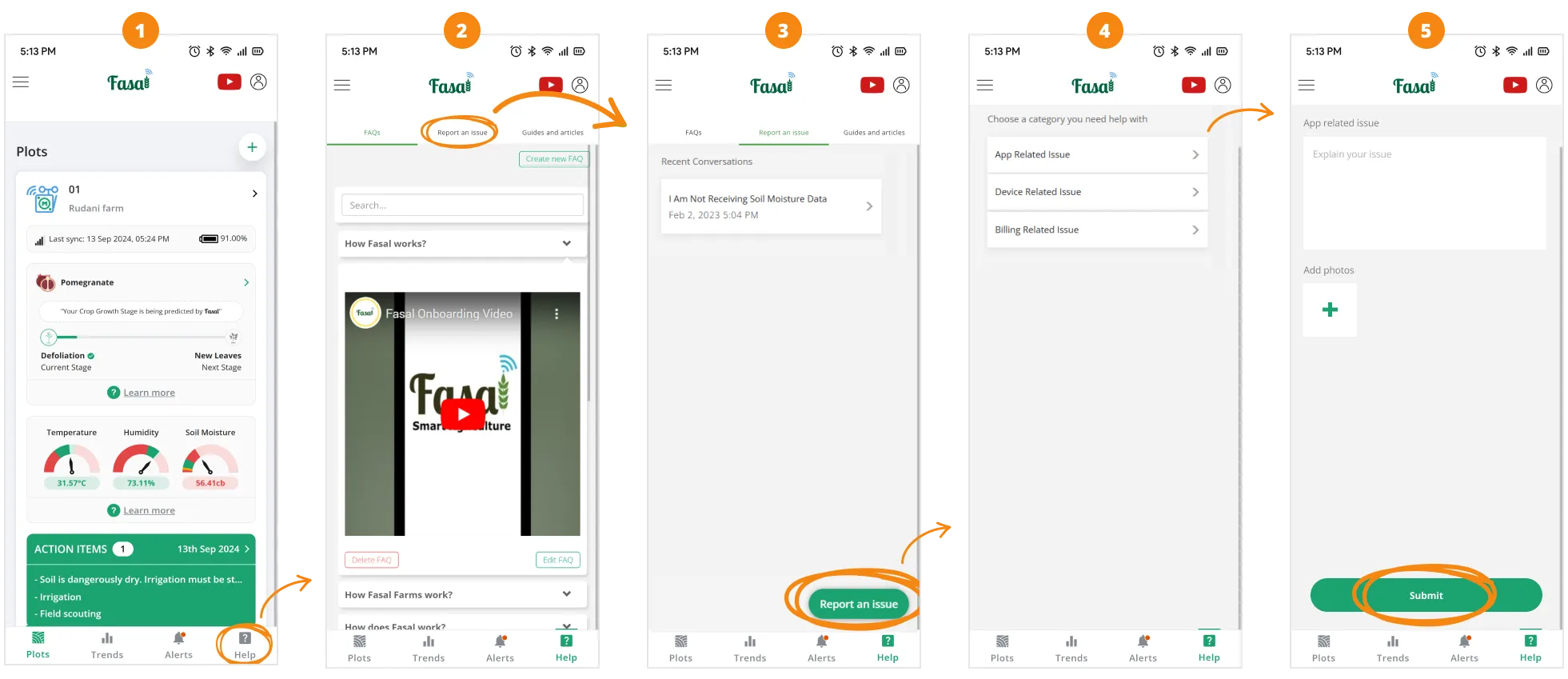
Current 5-step help reporting flow
- 01Too many steps: The 5-step process loses most farmers before they finish. Problems go unresolved, trust erodes.
- 02Hard to find help: The report button is buried inside the help section, not visible until farmers already know where to look.
- 03Mismatched problem categories: The preset list doesn't reflect what farmers actually experience, forcing them to pick the closest wrong answer.
- 04Writing is a barrier: Farmers with low literacy or no keyboard proficiency can't explain their problems in text.
- 05No multilingual support: The system only works in languages farmers can type, which excludes most of them. Issues get misreported, or not reported at all.
- 06Overloaded support team: Unclear written tickets mean agents spend extra time diagnosing issues, slowing resolution and reducing satisfaction on both sides.
03Design Process
DISCOVERY
Field Visit & Define
Interviewed farmers & stakeholders to map pain points in the legacy help section.
STRATEGY
Ideate & Design
Brainstormed solutions and presented viable prototypes to Head of Product.
EXECUTION
Prototyping & Testing
Built high-fidelity interactive flows and conducted Useberry usability tests.
REFINEMENT
Feedback Implementation
Iterated on prototypes based on direct farmer interactions and data analysis.
04Field Discovery
We started inside, interviewing the sales and customer success teams to understand the support team's perspective. Then we went to the farms to see the problems firsthand.
Internal Narrative
Stakeholder Feedback
Field Insights
Farmer Voice
Only 42% of tickets were raised via the app; the majority remained offline or via direct calls.
Users abandoned the ticket-raising process mid-way, highlighting high cognitive friction.
05Ideation & Goals
Farm visits confirmed what the support data suggested: farmers were abandoning the help flow before it could help them. These sessions shaped our design goals directly.
- 01Work for farmers regardless of literacy, voice-first, not text-first.
- 02Surface help with one tap, not buried two levels deep.
- 03Improve ticket quality so the support team can resolve issues faster.
- 04It should look and feel consistent with the rest of the app.
06Design exploration & finalization
We built on the discovery with a clear question: should Help live separately from Articles, or on the same page? We designed one option for each to put it to the test.
Design Options
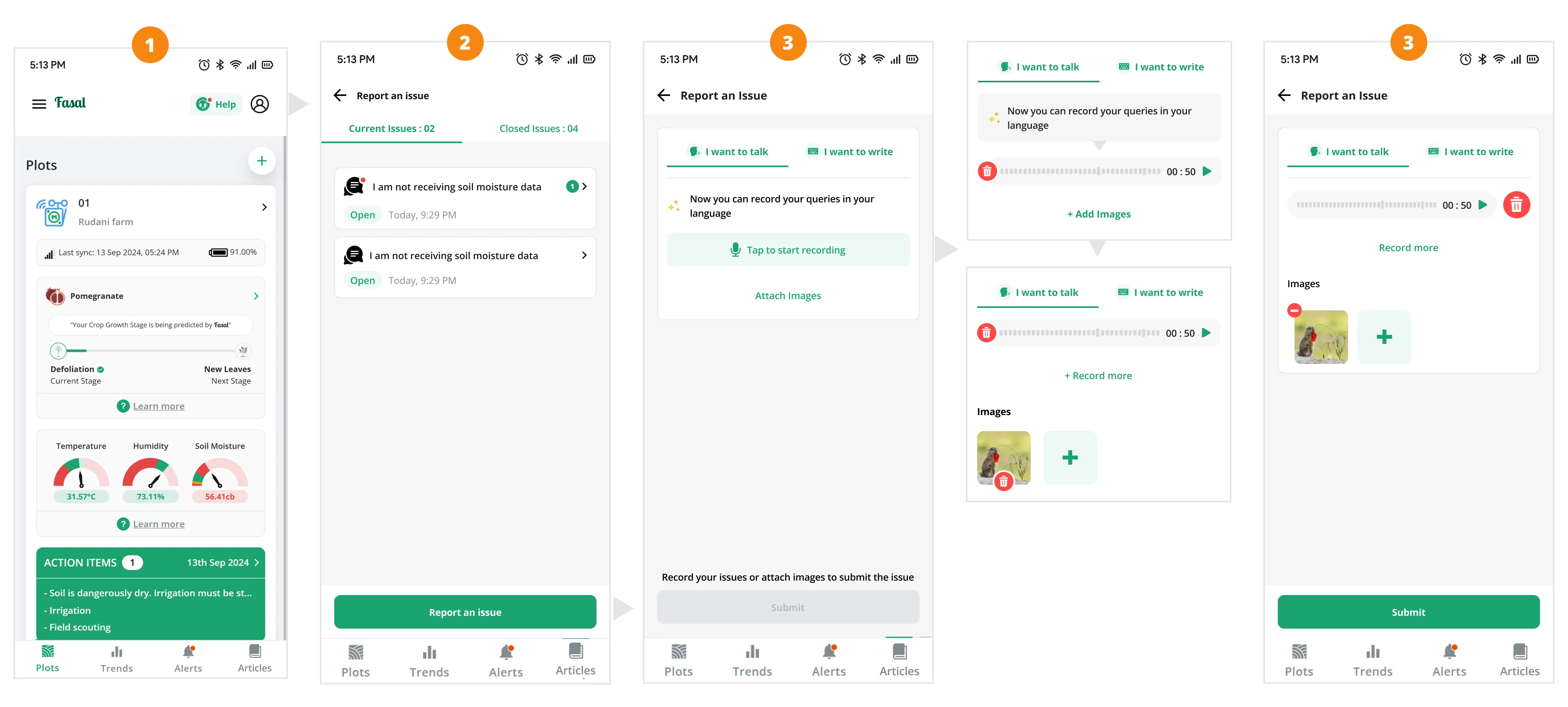
Design Option 1
- 01Separated the Help CTA from articles and made it impossible to miss.
- 02Reduced the number of steps from 5 to 3.
- 03Introduced a voice recording option alongside text input, removing the language barrier.
- 04Removed predefined categories so farmers describe issues in their own words.
- 05Separated Articles from Help to reduce confusion when looking for support.
07Prototyping & User Testing
We built interactive prototypes for both options and ran structured usability tests in Useberry with 12 farmers.
GOAL
01Usability & Intuition
Evaluate the usability and intuitiveness of the new help section design
GOAL
02User Preference
Assess user preference between the two design options
GOAL
03Audio Effectiveness
Measure the effectiveness of the audio recording feature for issue reporting
GOAL
04Experience Feedback
Identify any confusion points or friction in the flow
GOAL
05Problem Validation
Determine if the new design effectively addresses the barriers identified in the current flow
Heat maps
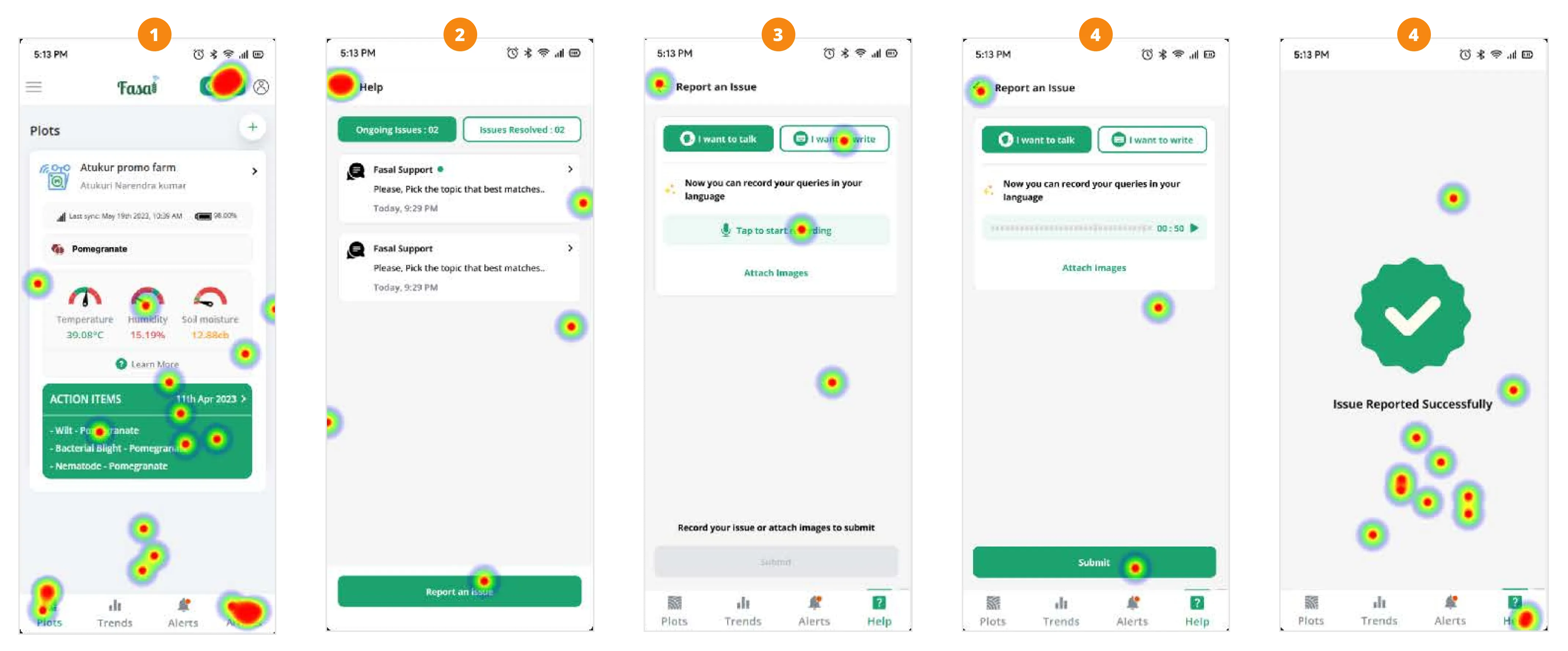
Key Findings
- 01All 12 users completed the flow and raised an issue successfully.
- 02Users described the process as very simple and easy to use.
- 03Users felt that the call-to-action (CTA) was prominently displayed and easily visible.
- 04Four farmers with low tech literacy initially struggled to find resolved issues, but eventually located them.
- 05Three farmers found terminology like 'Issues resolved' challenging to understand.
08Conclusion
FINDING
01Preference for Design Option 1
100% of users found the separate Help CTA in Option 1 more intuitive and easier to access.
FINDING
02Voice recording changed everything
Users appreciated being able to record issues verbally, especially those with limited literacy or typing skills.
"Users liked the audio recording feature because they could speak in their own languages."
FINDING
03Fewer steps made a real difference
Farmers described the new 3-step flow as fast and stress-free. No one needed to be shown how to use it.
FINDING
04Improved discoverability
Users reported finding the help section easier to locate in both new designs compared to the current flow.
FINDING
05Freedom to describe in their own words
Without preset categories, farmers reported issues more accurately.
FINDING
06Areas for improvement
Some terminology requires simplification and users initially struggled to locate resolved issues.
FINDING
07Key Finding
Option 1 resolved every key barrier: fewer steps, one-tap discoverability, and voice input that works regardless of language or literacy level.
09What We Changed After Testing
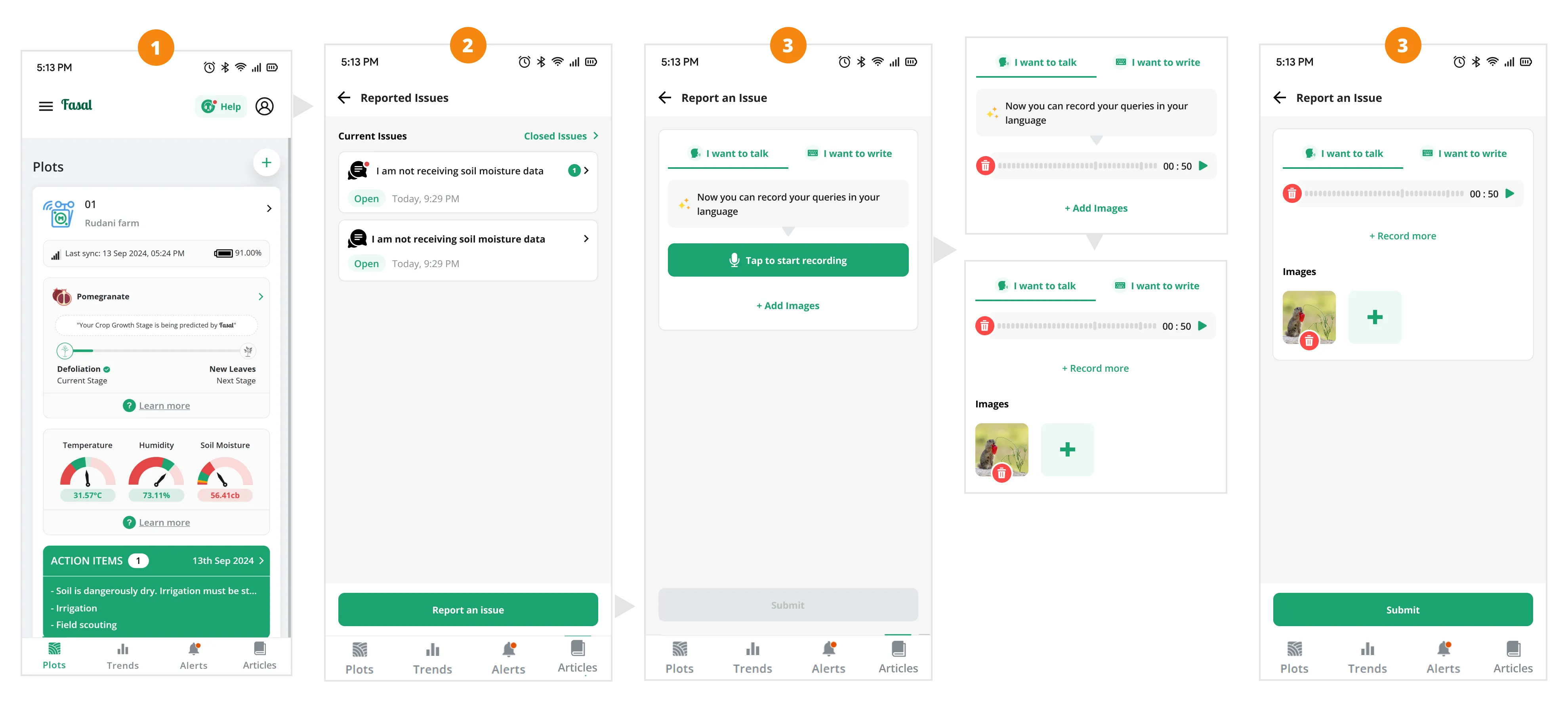
Final refined interface incorporating user testing feedback
- 01Simplified terminology throughout the help section: Changed Resolved issues to Closed issues for clarity. Changed Attach images to Add images, shorter and more natural.
- 02Combined closed and active issues on a single page so farmers can find both without switching views.
- 03Made Tap to record the primary call-to-action on the page, more prominent than the secondary options I want to talk and I want to write.
10Impact
Showing massively improved accessibility.
Confirmed language barriers as a primary friction point.
Better optimization for handheld field reporting.
Diagnostic automation reduced manual agent intervention.
Data based on 6 months post-deployment tracking and stakeholder interviews.
11Way Forward
- 01Keep listening: Schedule quarterly field visits and in-app feedback reviews to catch new pain points early.
- 02Refine the language: Keep testing label clarity with farmers, especially for technical states like ticket pending or escalated.
- 03Smart triage: Explore AI voice recognition to auto-categorize tickets by issue type, reducing manual sorting for the support team.
- 04Grow the self-help library: Map common ticket types to new guides, with a target to resolve 20% of issues without agent contact.